Please download the attached notebook of all input code at the bottom of the page

##Preamble##
I found programming with playing cards in Mathematica is a pleasing experience. This time I use MaTeX and pst-Poker \LaTeX package to computationally design the card arrangement above. The middle part is the 11-digit toll-free customer service number of Wolfram in US and Canada ( Use Queen to replace zero). The ring surround it the rest of a 52-card deck, 41 cards in total. The cards on the ring are sorted in numeric order (A - 1 to K - 13) and in alternated suit for each value (spade, heart, diamond, club). The design mimics the actual procedure of fanning cards and drawing some of them to assemble a desired phone number if possible.
##Setup MikTeX/LaTeX Environment##
Use the instruction from this link GitHub - szhorvat/MaTeX: LaTeX labels in Mathematica · GitHub to install the required Mathematica package. Also you need ghost script and MikTeX to include required TeX components, including executives, runtime and all required packages. Once you have everything on you local machine, you can test them in a notebook
<< MaTeX`
ConfigureMaTeX[] // TableForm
Usually you can use the default configuration, but in our case we have to choose a different engine XeLaTeX, a relatively modern extension comparing to pdfLaTeX. The step is required to render pst-poker contents properly. For example, on Windows I use

##Examples##
Let’s assume we have the environment ready, we can play around some simple cases
-
Single card
MaTeX["\\crdAs", "Preamble" -> {"\\usepackage{pst-poker}"}]

according to pst-Poker’s documentation, we can add an option to remove shadow:
MaTeX["\\psset{crdshadow=none}\\crdAs", "Preamble" -> {"\\usepackage{pst-poker}"}]

-
Inline Cards
MaTeX["\\As\\tenh\\sevd\\sevc\\Qd","Preamble"->{"\\usepackage{pst-poker}"},FontSize->36]

-
Float Card: you may also find the
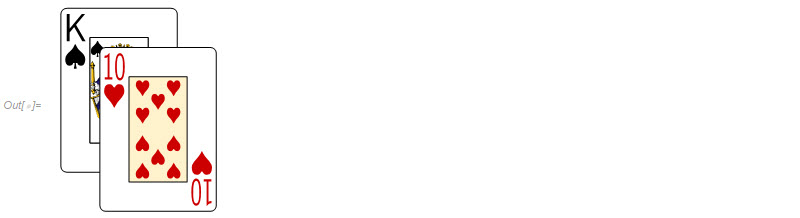
Outlabel is close to the bottom of the cards. So we can add aBaselinePositionoption withShowfunctionShow[MaTeX["\\psset{crdshadow=none,unit=1.4}\\crdpair{\\crdKs}{\\crdtenh}","Preamble"->{"\\usepackage{pst-poker}"}],BaselinePosition->Center]
##Card Name Mapping##
To computationally retrieve the cards, we need to find a way to automatically generate the card identities and a mapping between valid input and its documented label. First we take a look at the values
value = With[{numerics = Range[10, 2, -1]},
   Thread[{"Ace", "King", "Queen", "Jack", Splice[numerics]} -> {
      "A", "K", "Q", "J", "ten", "nine", "eig", "sev", "six", "five", "four", "tre", "two"}]];

Then we find the key-value pair between suit name and its shorthand
suits = Thread[{"Spade", "Heart", "Diamond", "Club"} -> {"s", "h", "d", "c"}];

Use the two tables above we can thread them together with Table function and StringJoin operator to create the full deck of 52 cards
deck = Flatten[Table["crd" <> v <> s, {s, Values[suits]}, {v, Values[value]}]]
(* {"crdAs", "crdKs", "crdQs", "crdJs" ..., "crdfourc", "crdtrec", "crdtwoc"} *)
MaTeX has one piece of syntax sugar that supports one level list, we flatten the list and pass it to MaTeX function to combine multiple calls into one call. Let’s create a gallery of all cards, 13 items per row and same suit in the same column
gallery = Partition[ With[{full = ("\\psset{crdshadow=none}\\" <> #) & /@ deck},
    MaTeX[full, "Preamble" -> {"\\usepackage{pst-poker}"}]], 13];

Rasterize[TableForm[gallery,TableSpacing->{0,0}]//Magnify[#,1.05]&]

##Advanced Card Placement##
There are two ways to move box objects kern<5pt> or raisebox from stackengine package. I feel the latter is easier to use. So my code is based on this code from SE:
hand=MaTeX["
\\newcommand\\inhand[3][100pt]{\\rotatebox[origin=c]{#2}{\\raisebox{#1}{#3}}}
\\setstackgap{L}{0pt}
\\Longunderstack{%
\\inhand{24}{\\psset{crdshadow=none}\\crdAs}
\\inhand{20}{\\psset{crdshadow=none}\\crdtenh}
\\inhand{16}{\\psset{crdshadow=none}\\crdsevd}
\\inhand{12}{\\psset{crdshadow=none}\\crdAh}
\\inhand{8}{\\psset{crdshadow=none}\\crdsevc}
\\inhand{4}{\\psset{crdshadow=none}\\crdQd}
\\inhand{0}{\\psset{crdshadow=none}\\crdtenh}
\\inhand{-4}{\\psset{crdshadow=none}\\crdsevc}
\\inhand{-8}{\\psset{crdshadow=none}\\crdQd}
\\inhand{-12}{\\psset{crdshadow=none}\\crdAs}
\\inhand{-16}{\\psset{crdshadow=none}\\crdsevc}
\\inhand{-20}{\\psset{crdshadow=none}\\crdQd}
\\inhand{-24}{\\psset{crdshadow=none}\\crdtenh}
}
","Preamble"->{"\\usepackage{pst-poker, stackengine}"}];

The computational way is to generate inhand function so that I can control the placement of cards based on the number of cards and my preference. It is simply by StringTemplate
StringTemplate["\\inhand{`1`}{\\psset{crdshadow=none}\\`2`}"][a,b]
Now we wrap up the code to some higher level code to insert the automatically generated code to TeX scripts
quarterHand[n_,r_Integer,start_:45]:=Module[{cardsConfig,input},
    cardsConfig=StringRiffle[MapThread[StringTemplate[
        "\\inhand{`1`}{\\psset{crdshadow=none}\\`2`}"],
         {Floor[Range[start,start-90,-90/(n-1)]],
           RandomSample[deck,n]}],"\n"];
          StringTemplate[
           "\\newcommand\\inhand[3][`1`pt]{\\rotatebox[origin=c]{#2}{\\raisebox{#1}{#3}}}
            \\setstackgap{L}{0pt}
            \\Longunderstack{%
             "<>cardsConfig<>"}"][r]]
Generate a randomized hand from our deck
hand=With[{input=quarterHand[12,100,60]},
           MaTeX[input,"Preamble"->{"\\usepackage{pst-poker, stackengine}"}]];
Show[hand, BaselinePosition -> Center] // Framed

Similarly, we change the starting position and ending position to create a random circular arrangement. We may need to remove some angular range to avoid overlaping cards at the meeting ends.
circularHand[n_,r_Integer]:=Module[{cardsConfig,input},
    cardsConfig=StringRiffle[MapThread[
    StringTemplate["\\inhand{`1`}{\\psset{crdshadow=none}\\`2`}"],
        {Floor[Range[180,-150,-330/(n-1)]],RandomSample[deck,n]}],"\n"];
    StringTemplate["
        \\newcommand\\inhand[3][`1`pt]{\\rotatebox[origin=c]{#2}{\\raisebox{#1}{#3}}}
         \\setstackgap{L}{0pt}
         \\Longunderstack{%
         "<>cardsConfig<>"
      }"][r]]
And we give it a proper radius of the circular frame to space the peeks of cards nicely
hand=With[{input=circularHand[52,Round[160*Sqrt[52/30]]]},
          MaTeX[input,"Preamble"->{"\\usepackage{pst-poker, stackengine}"}]];
Show[hand, BaselinePosition -> Center, ImageSize -> 400]

##Summary##
- Use
MaTeXandghostScriptto link Mathematica and \LaTeX output - Use Mathematica computation and string manipulation to control object coordinates in \LaTeX
- Use
pst-Pokerto create nice playing cards within \LaTeX
inputCode.nb (28.7 KB)
 – you have earned Featured Contributor Badge